
Schedule an event to post later
Create an event now and choose when your group can see it and sign up.
Set up next Monday’s event today and have it go live at 6:00 PM the Monday before. Until then, only you and your group’s organizers can see it. At that time it opens for signups and the group gets the usual new event notification.
You can schedule public Round Robin and Who’s Attending events in a group. Private events and Club Matches post right away.
Schedule the post
Section titled “Schedule the post”-
Create an event as usual, and continue to the Review step.
-
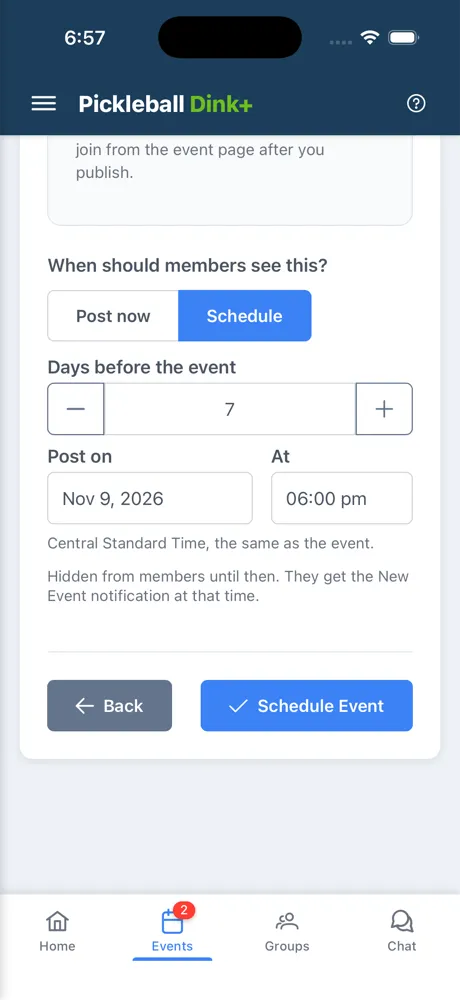
Under When should members see this?, tap Schedule.
-
Enter a number under Days before the event, such as 7 for a week ahead. It fills in Post on and sets At to 6:00 PM, and you can change either one.
-
Tap Schedule Event.
The post time uses the same time zone as the event, shown under the picker. It has to be in the future and before the event starts.
While it’s waiting
Section titled “While it’s waiting”The event shows in your list with a Posts badge, and its page has a banner saying when it will post.
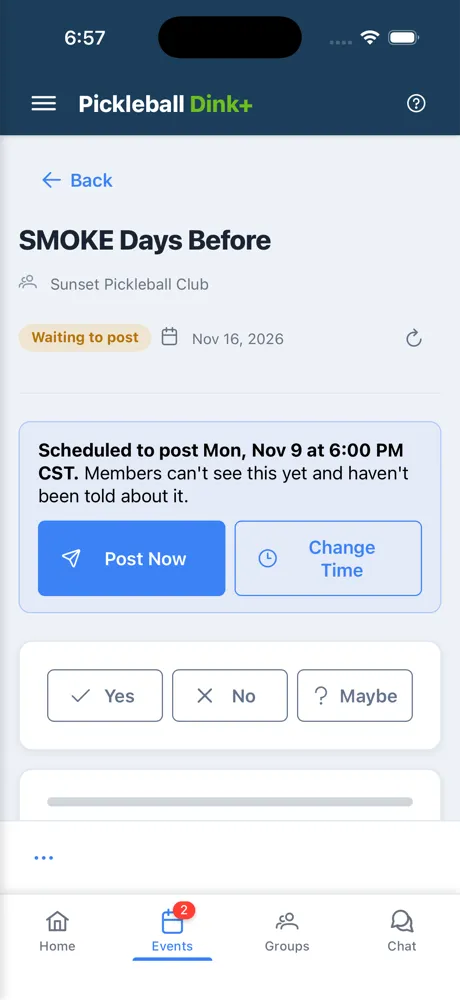
- Post Now posts it right away and notifies the group.
- Change Time picks a new post time.
- Change Settings and Add Player or Add Guest in Organizer tools still work. Nobody is told about any of these changes until the event posts.
- Delete Event in Organizer tools removes it, and nobody is notified.
Members don’t see the event anywhere until it posts, and a direct link to it says it can’t be found. That includes players you added ahead of time.
When it posts
Section titled “When it posts”- Group members get the new event notification.
- Players you added get the “You’re in” notification instead, so they aren’t told twice.
- You get a notification confirming it posted.
It can take up to a minute after the time you chose.