
Up and Down the River
Ranked courts where winners move up and losers move down after every game, with a new partner each round.
How it works
Courts are ranked: Court 1 is the top court, the last court is the bottom. Each round, every court plays one game, 2 vs 2.
When a round is done:
- The winners on each court move up one court, and the losers move down one.
- The winners on Court 1 stay on Court 1, and the losers on the bottom court stay there.
- Partners split. On each court, Dink+ pairs players so nobody keeps last round’s partner, and repeats as few partnerships from earlier in the night as it can.
Because each round depends on the last one’s scores, Dink+ makes rounds one at a time. Before every round you get a Set up round card to check the ladder, then you start the round.
Who it’s for
Open play where players want to climb to the top court, with a new partner every game.
Players and courts
- 4 or more players. Courts fill from the top in fours.
- No gender rules; any mix plays together.
- There’s no set number of rounds. Play until you end the event.
- When players don’t fill the courts in fours, or there are more players than courts, some sit out for the round. Dink+ picks the players who have sat out the fewest times, then the ones whose last sit-out was longest ago. Players who sit out keep their place in the ladder.
Settings
Under Pick a format, tap Up and Down the River. Set Scoring (a label for how games are played), Courts, Min/Game, and Court Labels. Scores are always tracked, because the winners decide who moves, so Rounds and Track Scores don’t appear.
Run the event
-
Add players and tap Start Event. The Set up round 1 card appears. Tap ? at the top of the card to open this page.
-
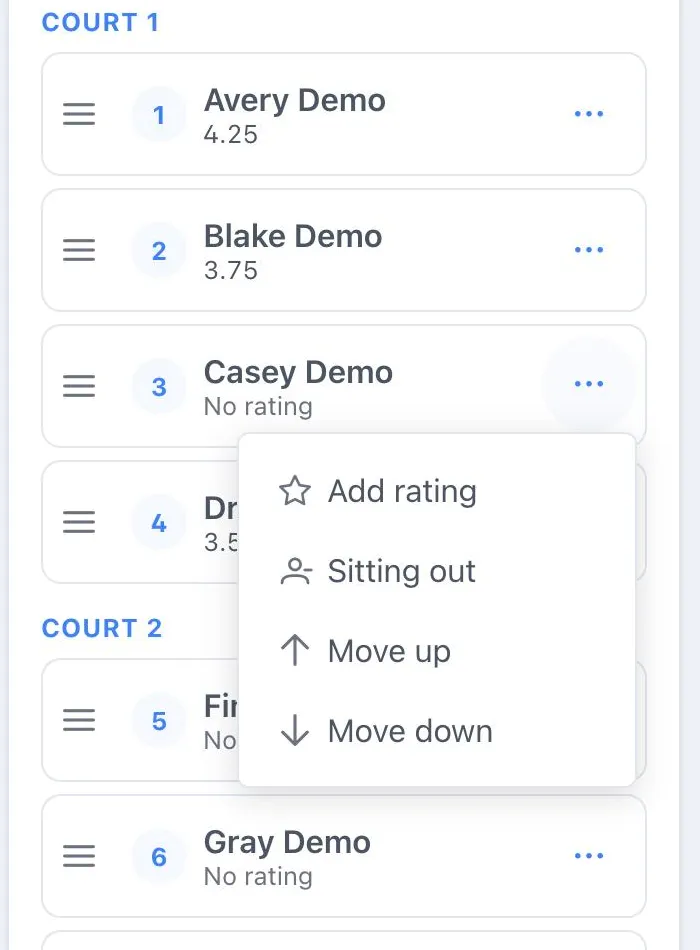
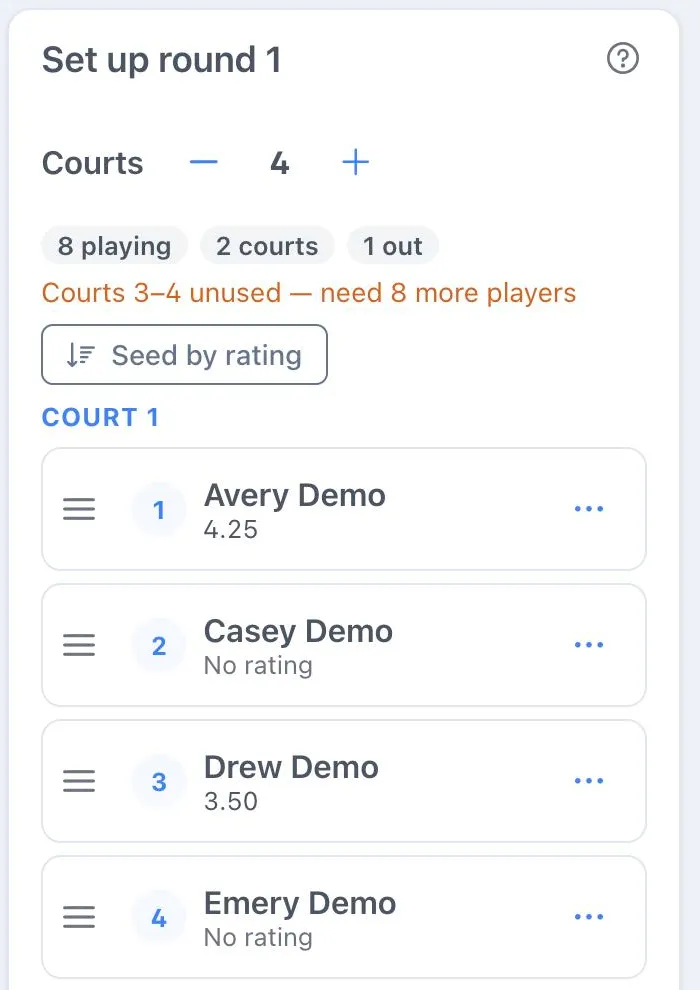
Put the ladder in order. The top 4 start on Court 1, the next 4 on Court 2, and so on. Drag a player by the handle on the left of their row (or tap ⋯ and choose Move up or Move down). Each row shows the player’s place in the ladder and their rating under their name. To order everyone by rating, tap Seed by rating (highest first; players without a rating go to the bottom).
-
Check ratings. Players with a linked account show their DUPR or profile rating. For anyone else (No rating), tap ⋯, choose Add rating, type one (2.0 to 8.0) and tap Save. Ratings you add are for this event only.
-
Add walk-ons: type a name under the ladder and tap Add player. They start at the bottom.
-
To take someone out, tap ⋯ and choose Sitting out. They stay out until you choose Back in. Players Dink+ sits out to make the courts fit say Sitting out this round; choose Back in for one of them and Sitting out for someone else to swap who sits.
-
Tap Start round 1. Players enter scores as in any Play Now event.
-
When every game in the round has a score, the Set up round 2 card appears with everyone already moved. Adjust if you need to, then tap Start round 2.
-
Repeat until you’re done, then tap End event.
Change the number of courts with − and + next to Courts on the setup card. The chips beside it count who’s playing, how many courts are in use, and who’s out. If some courts won’t be used, an orange line says which, and how many more players they need. If someone arrives or leaves, add them or mark them sitting out before you start the next round.
Fixing a mistake
- Wrong ladder or courts: while no game in the new round has a score, open Game Functions and tap Cancel round. Its games are removed and the setup card comes back.
- Wrong score: scores can be corrected until the next round starts. After that they lock, because the courts were set from them. To fix one, cancel the new round (before it has any scores), correct the score, and start the round again.
Once round 1 has started, players can’t be removed from the event, because that would erase the other players’ results. Mark them Sitting out instead.
Standings
The leaderboard ranks players by win %, then average point differential, then head-to-head, the same as other Play Now formats. It also shows the court each player played on most recently.
What everyone sees
- Organizer: the Set up round card between rounds, and the round’s games while it’s played.
- Players: their court (for example, “Court 2 of 4”) and partner during a round, and “Waiting for the organizer to start round 3” between rounds.
- TV Display and Spectator link: the courts during a round, with Court 1 marked as the top court. Between rounds, the standings with the court each player just played on, and “Next round starting soon”.