
Use your group's page
See one group's upcoming events, chat, members, and leaderboard in one place.
Every group has its own page. Use it when you only care about one group, like checking what’s next for your Thursday crowd.
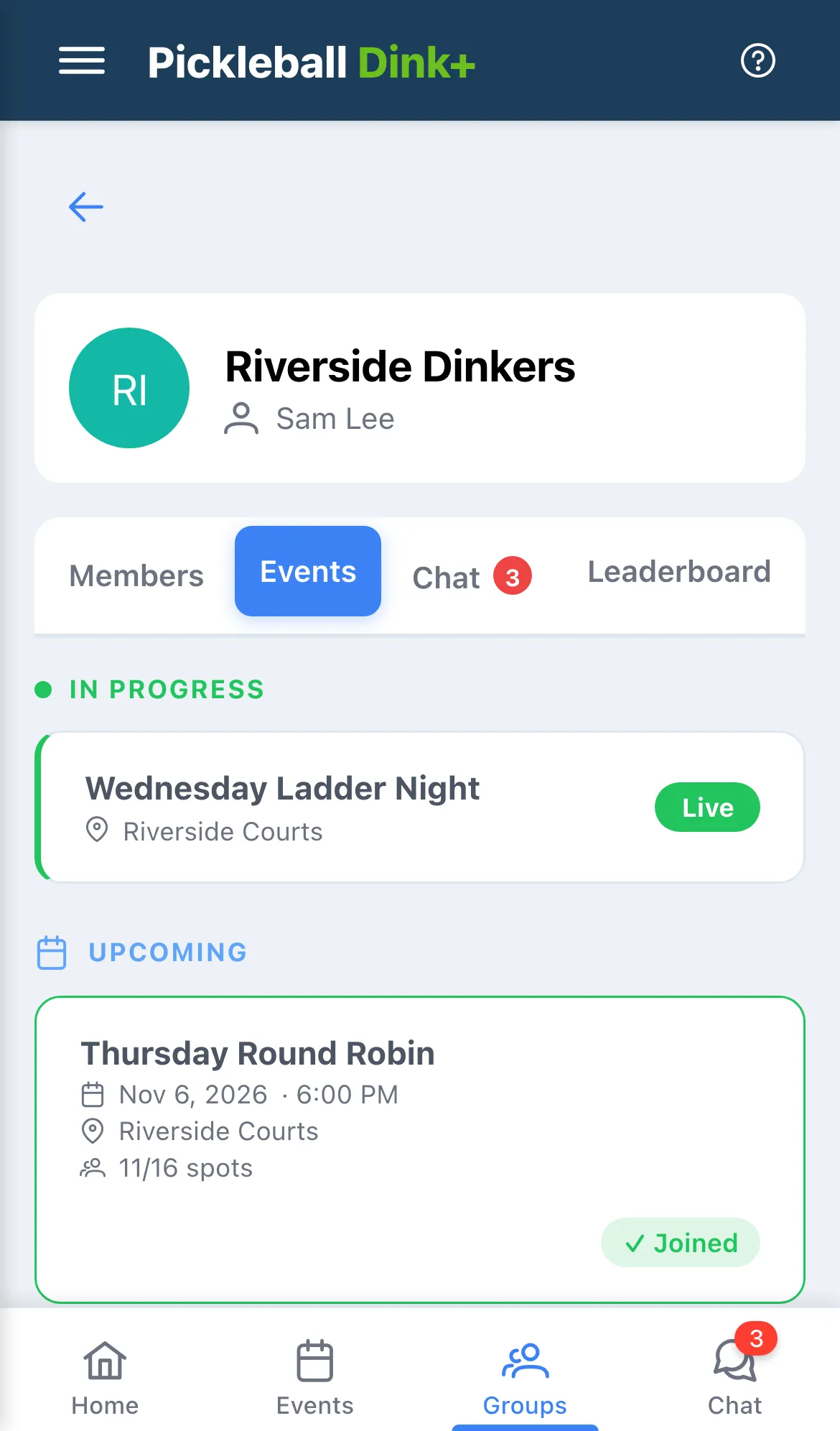
- Open Groups and tap a group. It opens on Events.
- Tap a tab to switch to Members, Chat, or Leaderboard.
Events
Section titled “Events”Events lists only this group’s events. Anything being played right now is under In Progress, and everything still to come is under Upcoming, soonest first. Tap an event to open it, or tap Join to take a spot. For a Who’s Attending event, Join marks you as going.
Finished events aren’t listed here. To see them, open the main Events page, tap the filter icon, pick this group if you’re in more than one, and turn on Completed.
Chat opens this group’s full-screen chat, with a red count if you have unread messages. The back arrow brings you back to the group. See Chat with your group.
Members
Section titled “Members”Members lists everyone in the group. Tap a name to see their profile. To leave the group, tap ⋯ on your own row, then Leave group….
Leaderboard
Section titled “Leaderboard”Leaderboard ranks the group’s players. Filter it by time period or gender. See Read the leaderboard for what the numbers mean.