
Play in a ladder league
Register, check in, play your weekly court, and track the season standings.
A ladder league is a multi-week season where you’re grouped onto a court with players near your level, and move up or down each week based on how you play.
Registering
Section titled “Registering”- Open the league’s public page (shared by your facility) and tap Register (or Sign in to register if you’re not signed in).
- Once registered, you’ll see You’re registered! and the league appears under Roster with your name.
You can Leave league from the Roster tab at any point while the league is open, and Rejoin league later if you change your mind.
Checking in each week
Section titled “Checking in each week”Before your court starts, open the league and check in for the week from the Roster tab — tap Check in next to your name. Organizers can also check players in for you.
Playing your court
Section titled “Playing your court”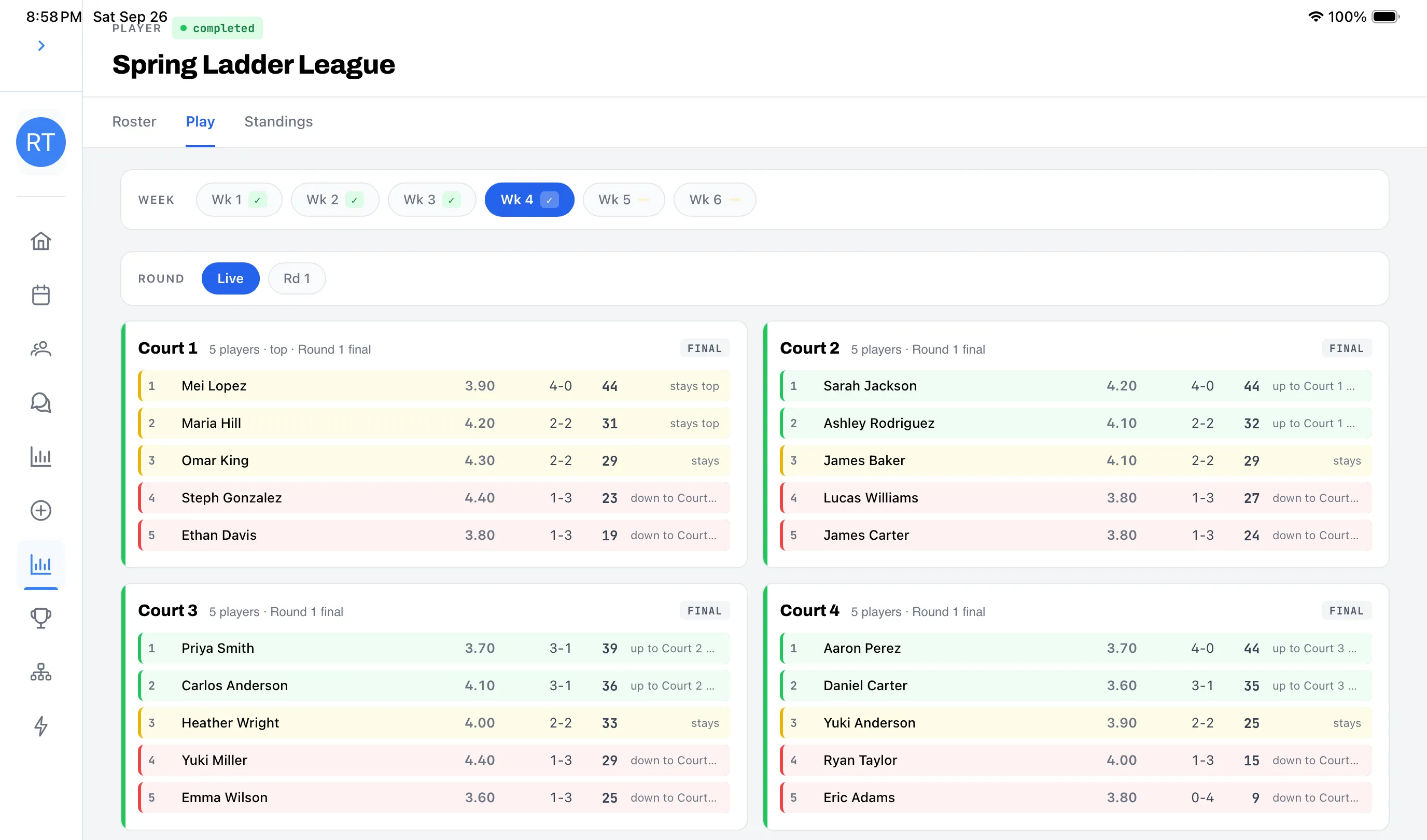
The Play tab shows every court for the current week:
- Your assigned court, its round, and who you’re playing with and against.
- Once your court is ready to start, tap in to enter scores the same way you would for any event — see Record scores.
- After a round finishes, the court card shows whether you moved up, down, or stayed for the next round or the next week.
Standings
Section titled “Standings”The Standings tab shows season rankings for every player: weeks played, points scored, and point differential. Filter by Cumulative or a specific week using the chips at the top.