
See matches on a court diagram
Switch a round robin to Court view to see who stands where, and enter scores beside each baseline.
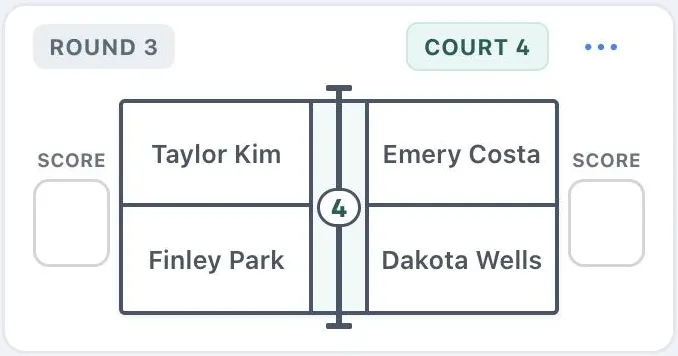
In a round robin event or a Play Now session, each match can show as a card or as an overhead court. Court view draws the court with the first team on the left and the second team on the right, so players can see their side at a glance.
- Open the event’s matches.
- Above Round 1, tap the court button (click it on the web), next to the card button.
- To go back, tap the card button.
Dink+ remembers your choice on this phone or computer. Court view works with both All matches and Your matches. Ladder courts, team matches, The Cleland, and Up and Down the River always use cards.
Enter scores in Court view
Section titled “Enter scores in Court view”When the event keeps score, a Score box sits outside each team’s baseline. Type both scores. Dink+ saves the game a moment after you stop typing, or straight away when you press Enter or move on. Once every game in a round has a score, that round folds up and the next one opens.
Finish a round in one tap
Section titled “Finish a round in one tap”When an event doesn’t keep score, each round header has a Tap to complete round button (Click to complete round on the web). It marks every game in the round Done, folds the round up, and opens the next one. To mark a single game, tap Tap when done on its card instead. The button shows when all matches are listed, not under Your matches.