
Brackets and playoffs
How each playoff format works, how teams are seeded and given byes, and how to generate the bracket and fix scores.
The Bracket tab shows a division’s playoff. Which playoff a division has is part of its setup. See Set up divisions. If you have more than one division, a switcher at the top picks which one you’re looking at, and it follows the Pools tab. When every bracket match is final, the tab shows BRACKET COMPLETE.
Players and the public see a read-only bracket. See Put the tournament on a TV for the display.
The playoff formats
Section titled “The playoff formats”| Playoff format | What happens | Needs pools |
|---|---|---|
| Single-elimination bracket | The top teams from each pool play a knockout bracket. Lose once and you’re out. | Yes |
| Single elimination (no pools) | Every confirmed team is seeded into one knockout bracket. | No |
| Double-elimination bracket | The top teams from each pool play a bracket where you’re out after two losses. | Yes |
| Placement matches (medal round, no advancement) | Neighboring finishers play one match each, to settle gold, bronze and lower places. | Yes |
| No playoff — final standings from pool record | The division ends after pool play. The Bracket tab says “This division finishes after pool play — see the Standings tab.” | Yes |
Customize your bracket
Section titled “Customize your bracket”You shape a bracket through the division’s setup. These are all the levers.
| Lever | Where you set it | Options | When it locks |
|---|---|---|---|
| Playoff format | Pools tab → Custom setup (or Change setup) → Playoff format | Single-elimination bracket, Single elimination (no pools), Double-elimination bracket, Placement matches, No playoff | When you tap Start division |
| How many advance | The same dialog → Top N advance per pool (1 to 8) | The bracket has this many teams per pool, rounded up to the next bracket size with byes. See How many teams advance. | When you tap Start division |
| Number of pools | The same dialog → Number of pools (1 to 8) | More pools means more first-place seeds, and more pool-mates to keep apart in round 1. See Seeding. | When you tap Start division |
| Bracket match format | The same dialog → Bracket match format (Playoff match format for placement) | Any of the eight presets | When you tap Start division |
| Final match format | The same dialog → Final format (Gold-medal match override for placement) | Any preset, or “— Same as bracket —”. For single elimination it covers the last-round match only. | When you tap Start division |
| 3rd-place match | Settings → Match formats per division → 3rd-place match | On or off. See Third-place match. | Never. |
| Courts for the division | Settings → Match formats per division → Courts | The courts bracket matches can use | Any time |
| Court or queue at generation | Auto-assign courts (Settings, Queue or Courts) | On sends first-round matches to empty courts. Off puts them in the queue. | Any time |
| Rebuild | Clear & Requeue on a pool match | See Rebuild a bracket. Not available for divisions with no pools. | Any time |
For a division with no pools, the setup is the playoff format, the formats, and the 3rd-place match. Seeds come from the Seed boxes on the Entrants tab, then the order teams entered. See Seed your teams.
How many teams advance
Section titled “How many teams advance”The number of teams in the playoff is Top N advance per pool times the number of pools, and never more than the teams in the division. Two pools with the top 2 advancing sends 4 teams to the bracket. One pool with the top 4 advancing also sends 4.
Seeding
Section titled “Seeding”For the pool-based brackets, the teams that advance are seeded like this:
- All first-place finishers come first, in pool order: A1, B1, C1 and so on.
- Then all second-place finishers, in pool order: A2, B2, and so on.
- Then third place, and so on.
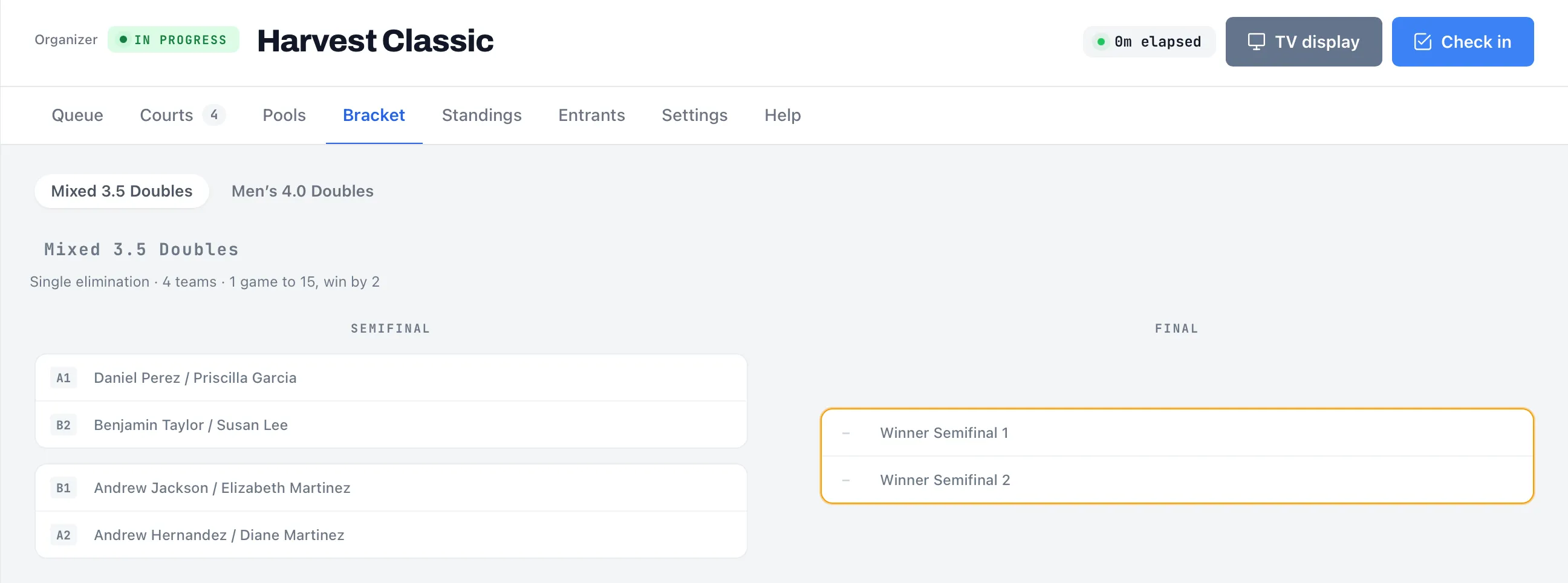
So with two pools and the top 2 advancing, the seeds are A1, B1, A2, B2. Seed 1 plays the lowest seed, seed 2 plays the next lowest, and so on, arranged so the top two seeds can meet only in the final. Round 1 is A1 against B2 and B1 against A2.
Dink+ also tries to avoid first-round matches between teams from the same pool, by swapping teams in the bracket where it can. It won’t take a bye away from a top seed to do so, so a rematch is still possible in some brackets.
Each team in the bracket shows a small chip with its seed label, such as A1 or B2. A slot waiting on a result reads, for example, “Winner Semifinal 1”. In a double-elimination bracket, slots read like “Winner W1-1” or “Loser C2-1”: the winner or loser of match 1 in round 1 of the winners side (W), or match 1 in round 2 of the consolation side (C).
A single-elimination bracket needs a size of 2, 4, 8, 16 and so on. If the number of advancing teams isn’t one of those, the bracket rounds up to the next size and the missing places are Bye slots. Byes go to the top seeds, who skip round 1 and start in round 2. With 6 teams, seeds 1 and 2 get byes. With 5, seeds 1, 2 and 3 do.
You don’t need to do anything for a bye. The team moves into round 2 by itself when the bracket is generated.
Generate the bracket
Section titled “Generate the bracket”You can generate a bracket once pool play is over.
- Finalize every pool match, so no pool match is pending, reported or disputed.
- Open the Bracket tab, or the Pools tab, and tap Generate bracket. For Placement matches the button on the Bracket tab reads Generate medal matches.
- A message reports the result, for example “Generated 3 matches — all assigned to courts” or “Generated 3 matches — added to the queue”.
On the Bracket tab the button is greyed out until the pool matches are all final. If Auto-assign courts is on, the first-round matches go straight onto empty courts. Otherwise they join the queue. Later rounds appear as the earlier matches finish.
Dink+ doesn’t generate the bracket for you when the last pool match ends. You have to tap the button.
Single elimination
Section titled “Single elimination”The bracket shows rounds named Round of 16, Quarterfinal, Semifinal and Final, left to right. When the final has a winner, a Champion card appears.
When you finalize a match, the winner moves into the next round, and the next match is created as soon as both teams are known. You don’t advance anyone by hand.
Third-place match
Section titled “Third-place match”A single-elimination division plays a 3rd-place match by default. It’s created when both semifinals are final, between the two semifinal losers. It appears in its own 3rd-place match section below the bracket. It uses the bracket match format, not the final override.
Turn it on or off in Settings → Match formats per division → 3rd-place match. See Tournament settings.
- Switching it on after both semifinals are final creates the match right away.
- Switching it off removes the match, even if it has already been played. Third place then becomes a tie.
- It needs a bracket with at least four teams. It isn’t available for double elimination or placement matches.
Single elimination with no pools
Section titled “Single elimination with no pools”A division with Single elimination (no pools) skips pool play. Every confirmed team goes into the bracket.
- On the Pools tab, tap Start division. This locks the roster and seeds, and needs at least 2 confirmed teams, all checked in.
- Tap Generate bracket. Until the division starts, the Bracket tab says “Bracket is generated once the division is started (that locks the roster and seeds).”
Seeds go to teams that carry a seed first, in seed order, then everyone else in the order they entered the division. Set seeds on the Entrants tab before you start the division, by hand or with Seed by DUPR. If you set none, seed 1 is the first team entered. Each chip shows its seed number. There are no pool conflicts to avoid, and byes work as above.
Placement matches (medal round)
Section titled “Placement matches (medal round)”Placement matches have no advancement. Dink+ ranks the teams that qualify, then pairs neighbors at once: seed 1 against seed 2, seed 3 against seed 4, and so on. They’re all created together when you tap Generate medal matches, and they can be played in any order.
| Match | Settles |
|---|---|
| Gold medal match | 1st and 2nd |
| Bronze medal match | 3rd and 4th |
| 5th / 6th place, 7th / 8th place, and so on | The next places |
The order is the same as above: with several pools, first-place finishers rank ahead of second-place finishers. There is no swapping to keep pool-mates apart. If an odd number of teams qualify, the last one gets no match and keeps its pool finish. The gold-medal match can have its own format. See Match and scoring formats.
Each medal match shows Pending, Court N or FINAL.
Double elimination
Section titled “Double elimination”Double elimination is another way to run the playoff. Everyone gets a second chance. The tab shows three sections:
- Winners bracket: everyone starts here. A loss drops you into the consolation bracket.
- Consolation bracket: a loss here eliminates you.
- Final: the Winners final winner plays the Consolation final winner in the Grand final.
If the consolation winner beats the winners-side champion in the grand final, each team now has one loss, so a Reset final is played. Dink+ creates it for you. It uses the same seeding, pool-mate swapping and byes as single elimination. There is no 3rd-place match.
You set the formats the same way as for single elimination. The Final format override covers the grand final and the reset final.
Fix a bracket score
Section titled “Fix a bracket score”Under the bracket, the Finalized Matches list shows each completed match with its score and an Edit button. For a medal match, the button is Edit score. The 3rd-place match has its own Edit button in its section. Tap it, enter the corrected games, and save. Only organizers see these buttons.
If you change the winner of a match whose winner has already moved on, a Confirm score change dialog lists the later matches that will reset. Matches already played show highlighted, and their scores are cleared and must be re-entered. Tap Confirm & reset to go ahead, or Cancel. Correcting a score without changing the winner just saves it.
Medal matches never reset anything else, because nobody advances from them.
If a mistake comes from a pool score, fix that instead. See Fix a score in a pool. A pool edit re-seeds a single or double elimination bracket after you confirm. It doesn’t change medal pairings. For those, see Rebuild a bracket.
Rebuild a bracket
Section titled “Rebuild a bracket”To throw a bracket away and build it again, use Clear & Requeue on any finished pool match. It isn’t available for a division with no pools, because it only works on pool matches. Confirm Clear & reset bracket, which removes every bracket or medal match. Dink+ doesn’t rebuild it by itself. Enter the match score again, then tap Generate bracket (or Generate medal matches). See Clear & Requeue.
Change the bracket by hand
Section titled “Change the bracket by hand”Once the bracket is generated, there’s no way to edit its slots, seeds or byes by hand. Set seeds on the Entrants tab before you start the division.