
Staff and co-organizers
See who can run a tournament, what each role can do, and how to add helpers.
Dink+ has one level of organizer access. Anyone who can manage a tournament can do everything organizers do in it. What differs is how they get that access, and what they can do outside the tournament.
Who can run a tournament
Section titled “Who can run a tournament”| Role | How they get access | Applies to |
|---|---|---|
| Facility owner | They hold the facility license and host the tournament. | Every tournament their facility hosts |
| Facility staff | The owner adds them in facility settings. | Every tournament their facility hosts |
| Co-organizer | An organizer adds them in the tournament’s Settings. | That one tournament |
| Entrant | They’re on a team in the tournament. | Their own team and matches |
| Everyone else | They have the public link. | Viewing only |
Owners and staff get access automatically. You don’t add them to each tournament, and they don’t appear in the Co-organizers list. Co-organizers are for people outside your facility staff, or for helping on one event only.
What each role can do
Section titled “What each role can do”“Organizer” below means the facility owner, facility staff, or a co-organizer.
| Action | Organizer | Entrant | Public |
|---|---|---|---|
| View the public page and TV display | Yes | Yes | Yes |
| Change settings, courts, divisions, fees and limits | Yes | No | No |
| Publish, complete, cancel, reopen a division | Yes | No | No |
| Add or remove co-organizers | Yes | No | No |
| Add, edit and withdraw entrants | Yes | No | No |
| Register themselves | n/a | n/a | Yes, when signup is open |
| Change their own registration | Yes | Yes, while signup is open and until their division starts (confirmed teams) | No |
| Withdraw their own team | Yes | Yes, until their division starts | No |
| Withdraw a team after its division starts | Yes | No | No |
| Pause or resume a division | Yes | No | No |
| Set seeds, break pool ties | Yes | No | No |
| Check players in or undo a check-in | Yes | A player can check themselves in | No |
| Assign pools and courts | Yes | No | No |
| Start a division, generate pools or a bracket | Yes | No | No |
| Enter a score | Yes, any match | Only for their own match | No |
| Confirm or dispute a reported score | Yes, any match | Only for their own match | No |
| Finalize, edit or clear a score | Yes | No | No |
| Send results to DUPR | Yes | No | No |
| Use the Check in screen | Yes | No | No |
Some things stay with the facility owner alone. These sit in Settings → Facility, not in the tournament:
- Connecting a Stripe account to collect entry fees.
- Adding and removing staff.
- Transferring ownership of the facility.
A staff member sees Your Facility instead, with a Leave Facility button.
Add a co-organizer
Section titled “Add a co-organizer”- Open the tournament and tap Settings.
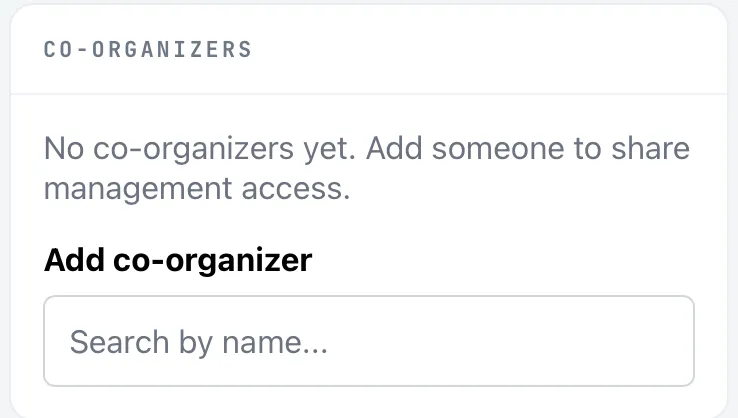
- In the Co-organizers card, type a name under Add co-organizer. The box says Search by name….
- Tap the person in the results. They get access right away.
To remove a co-organizer, tap the × next to their name.
- Anyone with a Dink+ account can be a co-organizer. A co-organizer can add and remove other co-organizers.
- You can’t remove yourself.
- You can’t add someone who already manages the tournament as the facility owner or staff. You’d see “User already manages this tournament”.
- Being a co-organizer doesn’t make someone facility staff. It gives no access to your facility license or facility settings.
- Co-organizers receive the same dispute alerts and refund emails as the facility owner.
Add facility staff
Section titled “Add facility staff”Only the facility owner can do this. See Facility settings, branding and staff.
- Open Settings → Facility.
- In the Staff card, search for a user and tap their name.
- To remove staff, tap the trash icon beside them.
Staff inherit your facility tier, so they can create tournaments and run all of yours. A person can be staff for only one facility at a time, and you can’t add yourself.
Things to know
Section titled “Things to know”- Everyone with organizer access can cancel the tournament. Dink+ asks them to confirm first, but a cancelled tournament can’t be brought back. Add only people you trust.
- Use co-organizers for volunteers who run one event. Use staff for people who work for the facility every week.
- Players don’t need organizer access to score. They can enter and confirm their own matches. See Scores, confirmation and disputes.