
Put the tournament on a TV
Show live courts on a public display that needs no sign-in.
The tournament display is a full-screen board of the courts in play. It’s public, so a Fire Stick, Roku or iPad browser pointed at its address can show it with no sign-in.
Open the display
Section titled “Open the display”Tap TV display in the tournament’s header. It opens the board in a new tab. To put it on another screen, open the same address there:
pbdink.app/tournaments/<code>/display
<code> is the tournament’s short code, the same one in its public link. See Scan to register.
The display works once the tournament is published, and stays up while it’s in progress and after it completes. For a draft or a cancelled tournament it shows “Couldn’t load tournament — retrying…”.
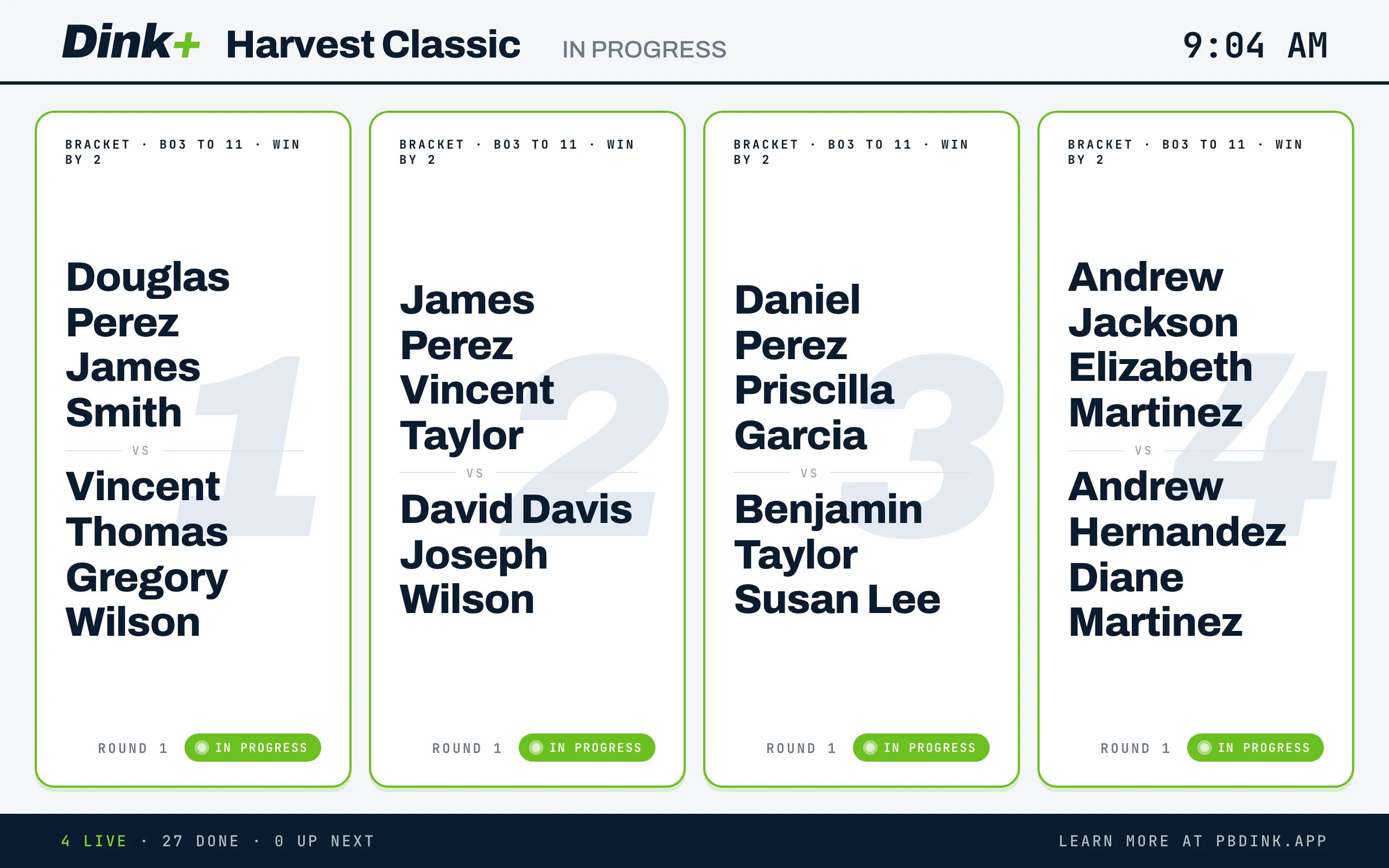
What the board shows
Section titled “What the board shows”Header. The Dink+ logo, the tournament name and its status in capitals, such as IN PROGRESS. The time of day is on the right.
Court cards. One card for each court that has a match on it, in court-number order. Courts with nothing on them are left off, so a quiet day doesn’t show empty cards. Each card has:
- A line for the match format, such as “POOL · 1 GAME TO 15 · WIN BY 2” or “BRACKET · BO3 TO 11 · WIN BY 2”. A final-format override shows only on the championship match: the last round of a single-elimination bracket, the final of a double-elimination bracket, or the gold medal match. Other matches show their normal format. Medal-round matches are labelled “GOLD MEDAL MATCH”, “BRONZE MEDAL MATCH” or a place such as “5/6 PLACE”, with no round number.
- Both teams’ names, with the court number as a large watermark.
- A Round tag for bracket matches (not for medal-round matches).
- A status pill.
| Pill | When |
|---|---|
| In Progress | The match is being played. |
| Waiting for round to finish | A score has been reported and is waiting for confirmation. |
| Final | Shown for a few seconds when a match is finalized, with the score. |
| Report to Court | Shown for 30 seconds or so when a new match goes on the court, so players know where to go. |
| Play Suspended | The match’s division is paused. The card turns amber. |
While a match is in progress the card shows no score. The score appears in the Final flash, then the card switches to the next match.
Footer. “N LIVE · N DONE · N UP NEXT” counts matches in progress, finished, and still to play. On the right, Learn more at pbdink.app.
While play is paused
Section titled “While play is paused”When you pause a division, its matches on court show Play Suspended. The header reads PLAY SUSPENDED when every division in progress is paused, or PLAY SUSPENDED followed by the division names when only some are. Resuming play clears it.
Keep it running
Section titled “Keep it running”The board updates live. A score entered at the desk shows on the TV within moments. If the live connection drops, a Reconnecting… note appears in the footer, and the board refreshes itself every 30 seconds until it reconnects. If the board can’t load at first, it keeps trying.